
Agent SLOs: Grounding autonomous agents in metrics that matter
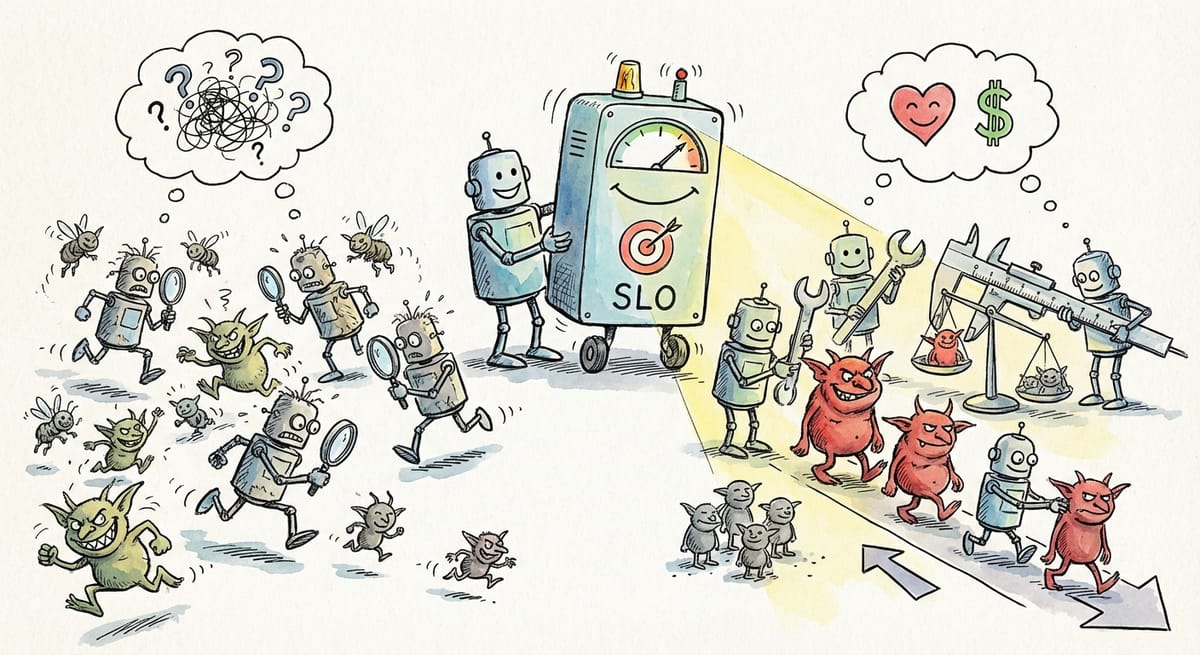
Today we're shipping Agent SLOs, a new feature that gives every Firetiger agent a structured way to track the health of the missions it's assigned. Agents now define their own service level objectives (SLOs), evaluate them every session, and use those evaluations to triage the issues they find.
The result: agents that stay grounded in what actually matters to your business, and issues that arrive pre-prioritized by real impact to outcomes you care about.
What is an SLO, anyway?
A Service Level Objective is a target for how well a system should behave, measured by a specific indicator. "Service" here is used in the "quality of service" sense of the word, and not the "sshd is a service" definition. An airline could set an SLO on how quickly or accurately you get your peanuts on your flight, as an example.
The concept was popularized by Google's Site Reliability Engineering handbook, which introduced a simple framework: pick an indicator that reflects user experience (a Service Level Indicator, or SLI), set a target for that indicator (the SLO), and use the gap between the target and reality to drive engineering decisions. Service Level Agreements (SLAs) are legal language that give SLOs teeth in things like contracts; they’re outside the scope of what we’re talking about here!
SLOs are powerful. An SLI like "authentication success rate" becomes actionable when paired with a target: "99.5% of authentication attempts should succeed." When that number drops, you know something is wrong, and you know how wrong it is. SLOs turn vague notions of "system health" into concrete, measurable commitments.
In practice, implementing SLOs is a slog and gets many teams stuck. Picking good SLIs requires deep understanding of your system's failure modes. Setting meaningful targets means gathering baseline data and making judgment calls about acceptable risk. Instrumenting metrics, wiring up dashboards, and keeping everything current as systems evolve is a project in its own right.
Most SLO initiatives stall long before they produce value, and see their utility decline over time as underlying instrumentation goes stale.
We wanted to bring the benefits of SLOs to Firetiger users without any of that overhead.
The problem with agents that only find issues
Firetiger agents are good at finding opportunities to improve your codebase and operations to better accomplish outcomes. Our agents surface things that need attention by ingesting observability data, connecting to your databases, your cloud providers, etc. But finding problems is only half the job. The other half is answering the question: how important is fixing or improving something, really?
Left to its own devices, an agent will treat every issue it finds with equal urgency. A naive agents instructed to find opportunities to improve a codebase, when they find any issue at all, will doggedly pursue them like, well, a dog on a bone. This is “task persistence”, a specific behavior that has been trained into the model with reinforcement learning. A background task that retries harmlessly might get treated the same as a JWT secret loading failure that blocks 10% of authentication attempts.
Without careful management, agents would end up bombarding engineers with low quality issues, forcing humans to do triage themselves, manually deciding which of the agent's findings actually deserve their time.
We wanted to improve the ability of our agents to identify what really matters to our customers and the outcomes they care about. For that, they needed something to measure against.
The hard part, handled for you
Anyone who has tried to implement an SLO framework knows where the complexity lives. Picking good SLIs. Deciding on meaningful targets. Getting buy-in on what "healthy" means for a given service. These are organizational problems as much as technical ones.
Firetiger sidesteps this entirely by putting the agent in charge of the selection process. You describe what you care about in plain language: "Monitor for errors that impact Firetiger users across all deployments. When customer-impacting issues are detected, create issues with customer notification drafts included." The agent's planning step takes that high-level intent and translates it into concrete, measurable SLOs. It chooses SLIs it can reliably compute from its connected data sources, sets targets based on observed baselines, and picks the right direction for each one.
You no longer have to enumerate SLIs, debate target percentages in a meeting, or wire up custom metric pipelines. The agent does the instrumentation work for you, and adapts telemetry and measurement strategies as your systems change.
What this looks like in practice
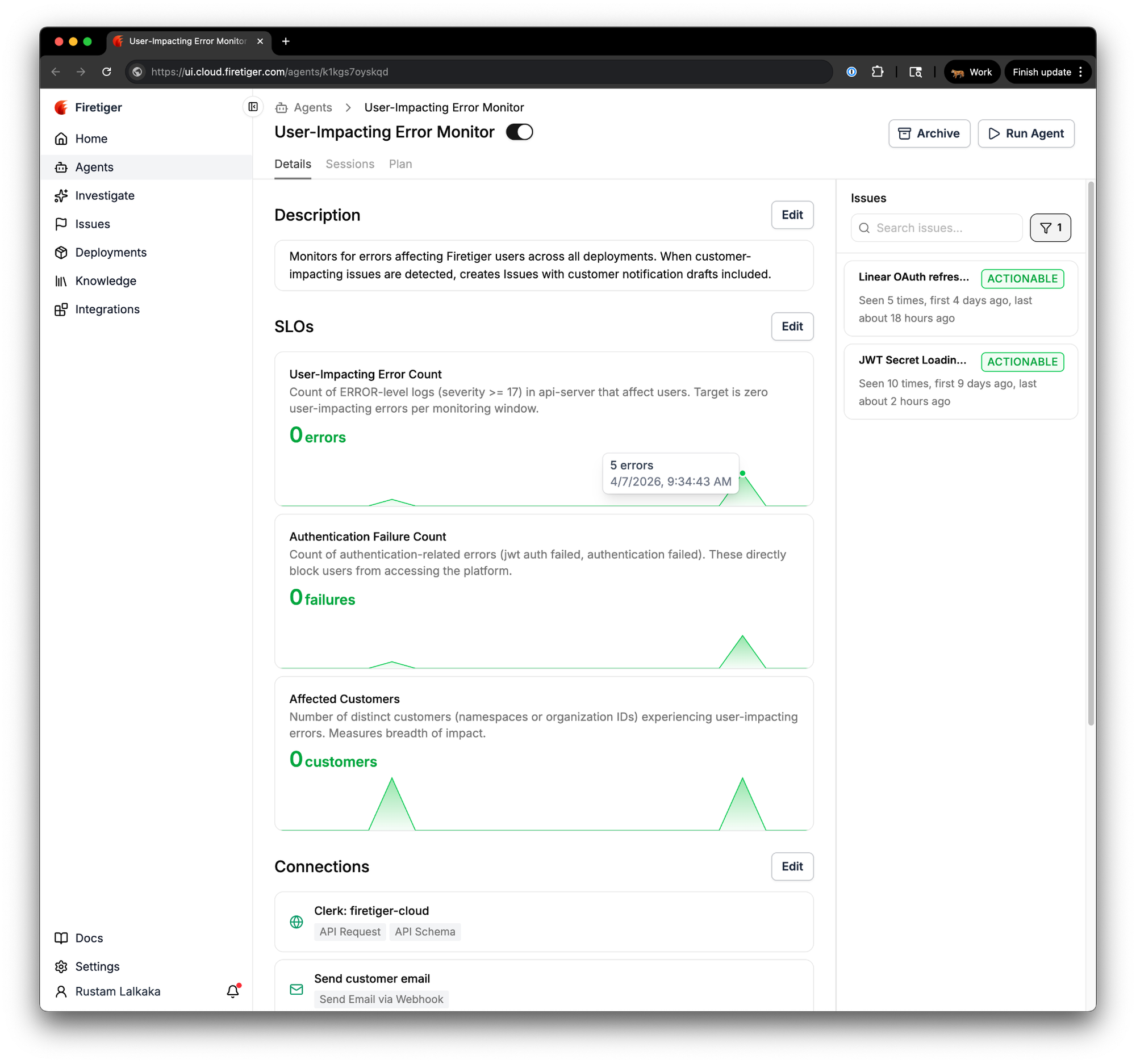
Here's a real example. We run an agent called "User-Impacting Error Monitor" that watches for errors affecting Firetiger users across all of our deployments. Based on its description alone, the agent's planning step defined three SLOs:
- User-Impacting Error Count: the count of ERROR-level logs in api-server that affect users, with a target of zero.
- Authentication Failure Count: the count of authentication-related errors (JWT auth failures, authentication rejections) that directly block users from accessing the platform.
- Affected Customers: the number of distinct customer organizations experiencing user-impacting errors.
Each SLO card shows the current score, a description of what is being measured, and a sparkline of recent evaluations. Green means healthy. Red means the metric has crossed its target. At a glance, you can see the trajectory of every metric the agent tracks.
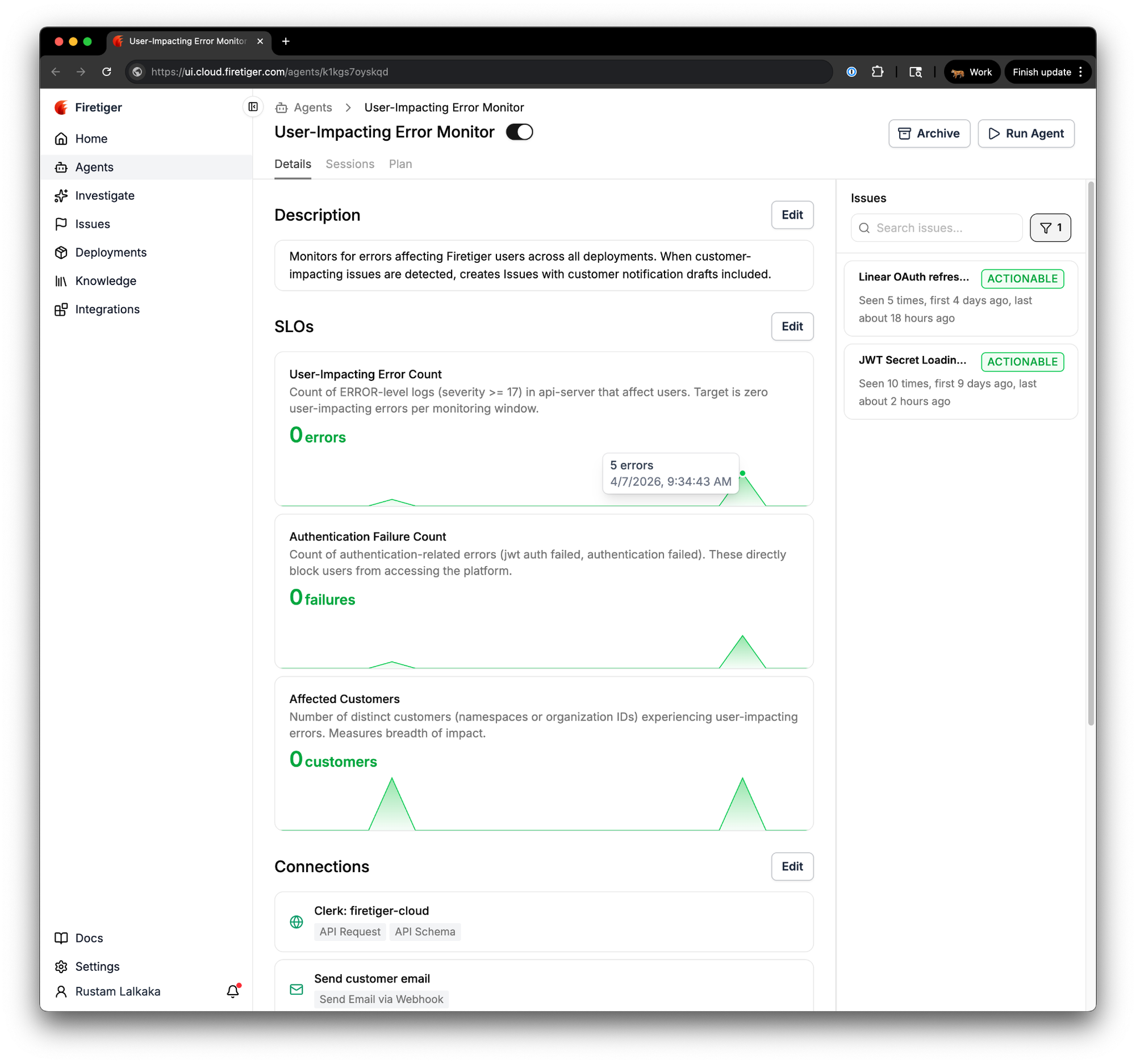
Notice that these are counts per monitoring window, not rates or ratios. Traditional SLO frameworks tend to favor ratios like "99.9% of requests succeed," but for this agent's objective the most direct question is "are any users being impacted right now?" A target of zero user-impacting errors per window, paired with a blast-radius metric like affected customer count, answers that question more naturally than a success rate would. The agent picks the simplest indicator that fits the objective.
We told it to monitor for user-impacting errors and it figured out the right SLIs on its own. We did not have to directly specify which log levels to query, which fields to group by, or what "authentication failure" means in our system.
How agents use SLOs to triage issues
The real value of these defined SLOs comes once the agent is running in prod, trying to figure out when users are having a bad time interacting (in this case) with Firetiger software. When the User-Impacting Error Monitor finds an issue, it measures that issue's impact against the SLOs it has been tracking. The issue page includes an "SLO Impact" section that quantifies exactly what fixing the issue would mean.
Take a real issue the agent found: "JWT Secret Loading Failures." The agent discovered that authentication middleware timeouts were canceling AWS Secrets Manager GetSecretValue calls, causing JWT validation to intermittently fail and succeed on retry. By itself, that's a useful finding. Without the outcome-engineering assistance Firetiger provides, this issue likely would have persisted in our codebase and occasionally nicked one our customers with a paper-cut for, well, a long time.
Once the issue was identified, the agent went further, and computed SLO impact: fixing this issue would eliminate roughly 310 authentication failures over the trailing 7-day window, bringing the Authentication Failure Count SLO back to its zero target and reducing Affected Customers from 6 impacted organizations to 0.
An engineer looking at this issue knows immediately that it is actively degrading a health metric they care about, and they know by how much. Compare that to a cleanup task that the same agent might surface with no measurable SLO impact. Both are real issues, but the SLO framing tells you which one to fix first.
What you see in the UI
Each agent's detail page now includes an SLO section showing every objective the agent tracks. Each SLO card displays the metric name, a description, the current score with its unit, and health status. When two or more evaluations exist, a sparkline chart renders the recent trend.
Green means the latest score meets or exceeds the target. Red means it has crossed the threshold. Gray means there is not enough data yet. Hover over any point in the sparkline to see the exact score and when it was recorded.
Units are flexible. SLOs can track percentages, milliseconds, bytes, currency, counts, rates, and throughput. The display auto-scales so that a latency SLO recorded in milliseconds will render as "1.2s" when appropriate, and a byte-denominated SLO will show "2.4 GB" instead of a raw number.
Who this is for
If you are already running Firetiger agents, SLOs are available on every agent today. Your existing agents will begin defining and evaluating SLOs on their next planning cycle with no action required from you.
If you are new to Firetiger, Agent SLOs are a good reason to start with the agents that monitor the systems you care about most. Stand up an agent, describe what matters to you, and within a few monitoring cycles you will have a live health dashboard that triages issues by real impact.
Grounded agents, prioritized issues
We built Agent SLOs because autonomous agents should be accountable to the same kinds of health metrics that engineering teams want to use to make decisions. By letting agents define, track, and evaluate SLOs on every session, we have given them the context they need to go beyond finding issues and start telling you which ones matter. The complexity of choosing good SLIs and setting meaningful targets is handled by the agent itself, guided only by what you tell it you care about.
The result is agents that stay grounded in the health of your systems and issues that arrive ready to act on, ordered by real, quantified impact to the things that matter to your business.
Agent SLOs are live today for all Firetiger users. Connect an agent, tell it what is important, and let it take it from there.