
Firetiger Change Monitors: does your PR do what it says on the tin?

Today, we're making Change Monitors generally available for all Firetiger customers.
Firetiger Change Monitors pair with every pull request to form a per-change safety net: an agent reads your diff, studies the systems it touches and how they behave in prod, and drafts a targeted post-deploy monitoring plan while the code is still in review. When the PR merges and the deploy lands, the change monitor agent activates, running specific checks against your logs, metrics, and traces and other available data.
The agent reports back on the PR with what it found, and whether the change did what you said it would do.
The end result: more changes go to production, faster, with less risk. Your customers and engineers will thank you!
Every engineering organization is a production system, and every production system has exactly one constraint
That is the core insight of Eliyahu Goldratt's The Goal: you can optimize everything else in the pipeline, but throughput is determined by the slowest step. The Theory of Constraints says the only work that matters is work that widens the bottleneck.
For the last twenty years, the bottleneck in software delivery was writing the code. That is why so much tooling went into improving it. Better IDEs, better type systems, better linters, better tests, better CI. Every one of those tools widened the constraint a little.
Now! The bottleneck around writing code is gone. Between agents, agents, and more agents, the rate at which code can be produced and reviewed has jumped by something like an order of magnitude in a year.
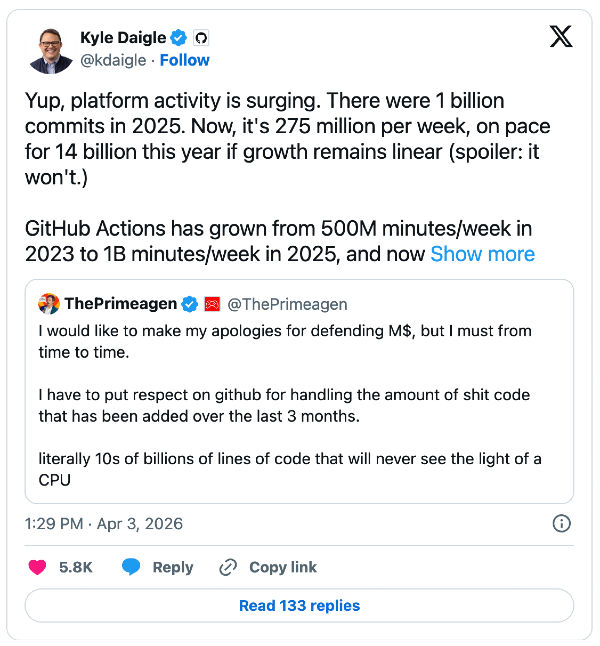
The constraint has moved downstream! For us, and for every team we talk to, the new slowest step is between "the deploy is green" and "I am confident this is actually working in production." That part is still manual, and often aspirational: someone diligently tailing a log, watching a dashboard, squinting at a p99 line. In reality, if nothing obvious blows up in the first ten minutes, the change is declared safe and everyone moves on.
That workflow sucked three years ago, and sucks even more now that changes are being produced at a much more furious clip. Safely running code in production is the next bottleneck in the software factory. Firetiger Change Monitors blow that bottleneck up by automatically verifying each change as it hits production, increasing change velocity, decreasing your bad change rate, and improving engineer happiness along the way.
What a Change Monitor actually is
A Change Monitor is a per-PR monitoring plan plus an agent that executes it. You create one by tagging @firetiger in a comment on a pull request, by pasting the PR URL into the Firetiger UI, by calling monitor_pr from the Firetiger Model Context Protocol (MCP) server inside your editor, or by letting Firetiger create one automatically whenever a PR opens (more on that below).
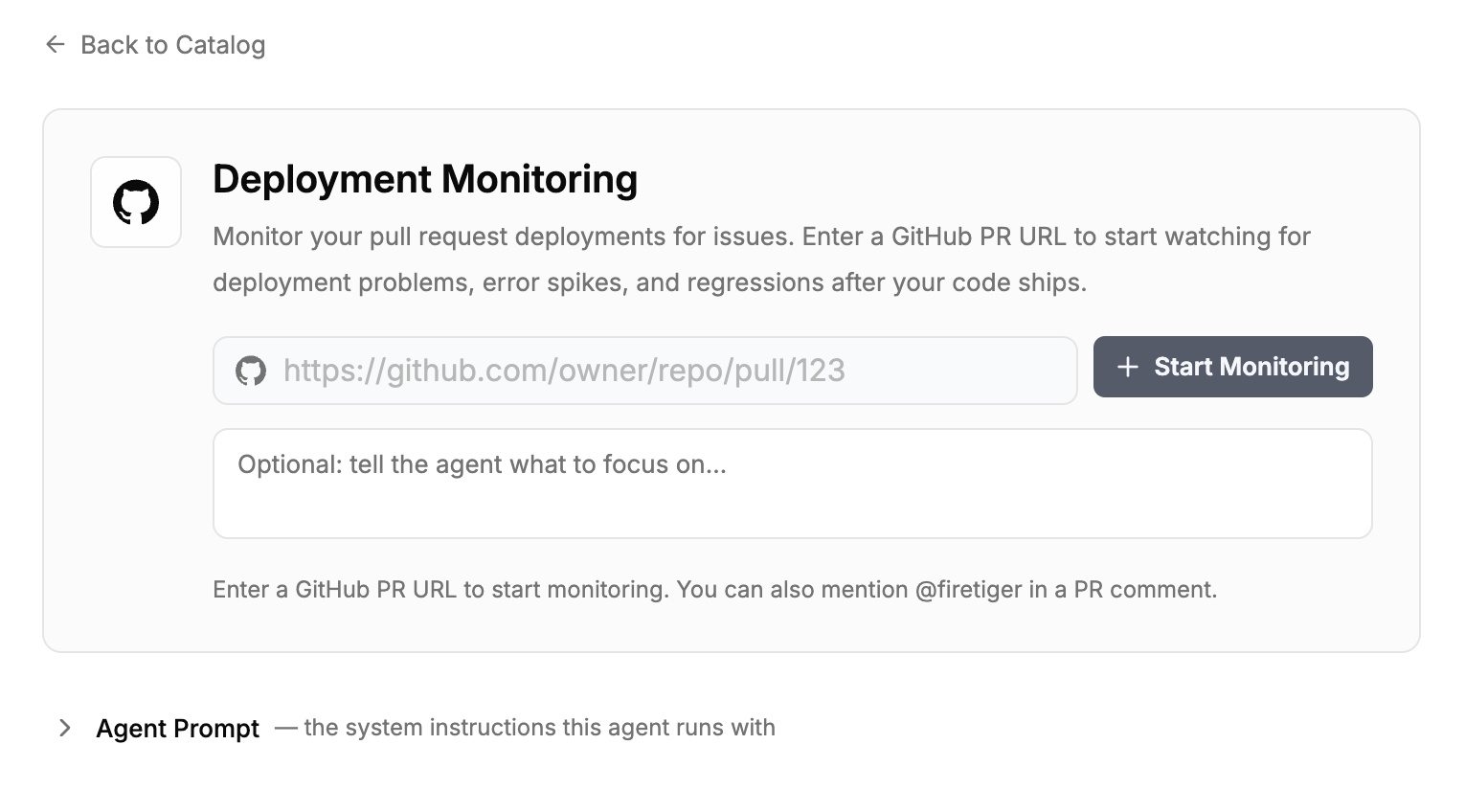
Once triggered, an agent does the work that a careful reviewer would do if they had unlimited time. It reads the diff. It walks the git history of the files that changed. It looks at the services those files belong to, the telemetry those services emit, and the current baselines for that telemetry. It uses all of that to draft a monitoring plan, which it posts back to the PR as a comment.
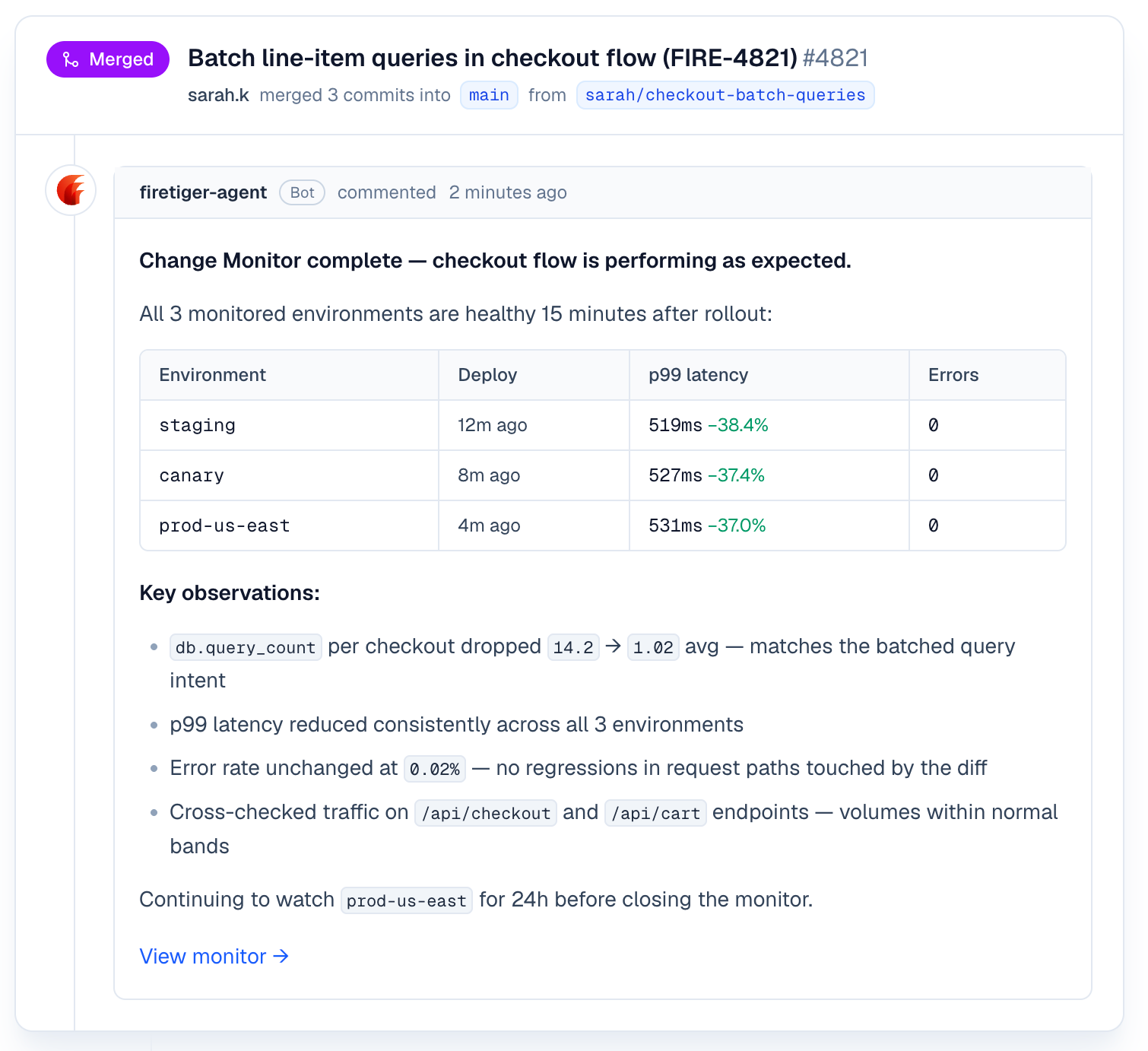
The plan has two halves. Intended effects: what is this change supposed to accomplish, stated in a form the agent can measure? (For example, "reduce auth p99 latency from 45ms to under 30ms," or "stop JWT validation from timing out during cold starts.") Unintended effects to watch: what could plausibly go wrong given what this diff touches, and what signals would tell us it has? The plan is refinable. Replies on the PR become feedback the agent incorporates before the plan locks in.
Changes, deployments, and environments
Under the surface, Change Monitors are built on three distinct concepts, each with its own config surface. Keeping them separate is what lets the feature be both automatic enough to use without thinking and precise enough to be trusted in complicated systems.
A change is the pull request itself. The plan is a property of the change: what to watch, why, and what the intended effect is. A change's plan is drafted once (when the PR is tagged, or when it opens if auto-monitoring is on) and can be refined through PR comments until the PR merges.
A deployment is a concrete event: a specific commit SHA reaching a specific place. Firetiger picks up deployments from GitHub Deployments webhooks automatically, or through an explicit POST /deployments call from any other CI/CD system. Each deployment that includes the change's merge commit activates the plan, and each one runs on its own checkpoint schedule. A single PR that promotes through staging and then production produces two independent runs, because those are two deployments, not one.
An environment is the named destination a deployment targets: staging, production, canary, whatever your pipeline calls them. Firetiger treats environments as first-class, configurable objects. A settings page lets you enable or disable monitoring per environment globally. Teams that want production-only monitoring flip staging off once; teams that want every environment watched leave everything on. The per-PR plan can also target specific environments.
That three-layer model is what gives Change Monitors their config surface. Per-change control lives on the PR. Per-deployment control lives in the checkpoint schedule and activation logic. Per-environment control lives in the global settings. You tune the layer that matches the decision you want to make.
What happens when the code deploys
When a deployment arrives, we check whether the monitored PR's merge commit is an ancestor of the deployed SHA, and whether the target environment is enabled for monitoring. If both are true, the plan activates for that environment. One issue-manager session per PR deduplicates findings across environments and across checkpoints, so the same regression spotted twice does not become two issues.
We run six checkpoints per deployment, at 10 minutes, 30 minutes, 1 hour, 2 hours, 24 hours, and 72 hours after the deploy. The early checks catch the problems that appear in the first error budget of traffic. The late checks catch the ones that only show up under a full daily cycle or a weekend's worth of background jobs.
At each checkpoint, the agent queries your telemetry against the plan. It looks for the intended effects (did latency actually drop?) and for the unintended ones (is the error rate on this service higher than it was an hour before the deploy?). When the agent finds something, it opens an Issue in your Firetiger project with evidence attached, and it posts back on the PR. When it confirms the intended effect, it posts that too.
Our agents are also able to take automated actions to progress or roll back deployments, all with appropriate guardrails.
A concrete example
Here's a recent one from our own application. Most features aren't just code, ie. a feature that reads data from a new bucket needs the bucket populated, and reading a config value requires that config value actually exist. In practice the code and the data/config ship on different pipelines: code through CI, data and config usually through Terraform or migrations. When those pipelines get out of sync, a deploy can go green on both sides and still ship a feature that does nothing.
That's what happened on PR #5355. The PR added a feature (code) that reads content from object storage. The code deployed fine across all environments. The companion pipeline that was supposed to populate the buckets with the data needed didn't run.
Everyone reading this blog has seen this movie before, but to spoil it: every service kept serving. Nothing returned an error. Uptime and status-code dashboards looked healthy. The new endpoint just returned empty results. This kind of failure is very hard to observe with classic observability tools, and the issue likely would have lay dormant for a while before a customer complained, with an annoying and sprawling investigation ensuing post-complaint.
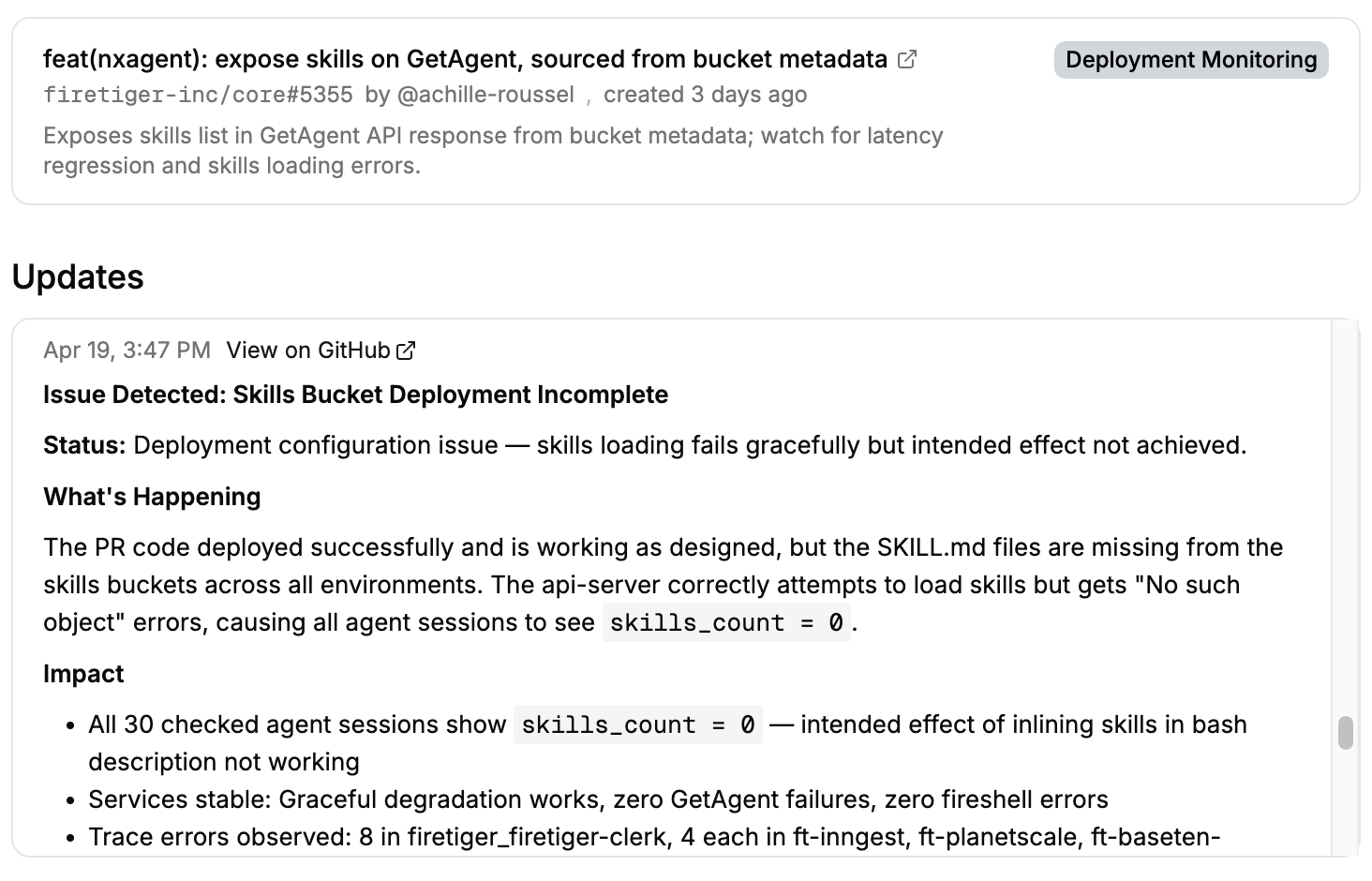
Luckily, the Change Monitor for the PR caught it 18 minutes after the deploy. It filed FT-144 with the specifics: dozens of object-not-found errors across nine environments, a hundred-plus log lines showing empty results from the new endpoint, and the observation that the PR's intended effect wasn't happening even though no error rate or SLO was busted. A follow-up PR fixed the pipeline a few hours later, the next checkpoint confirmed recovery, and the issue closed on its own.
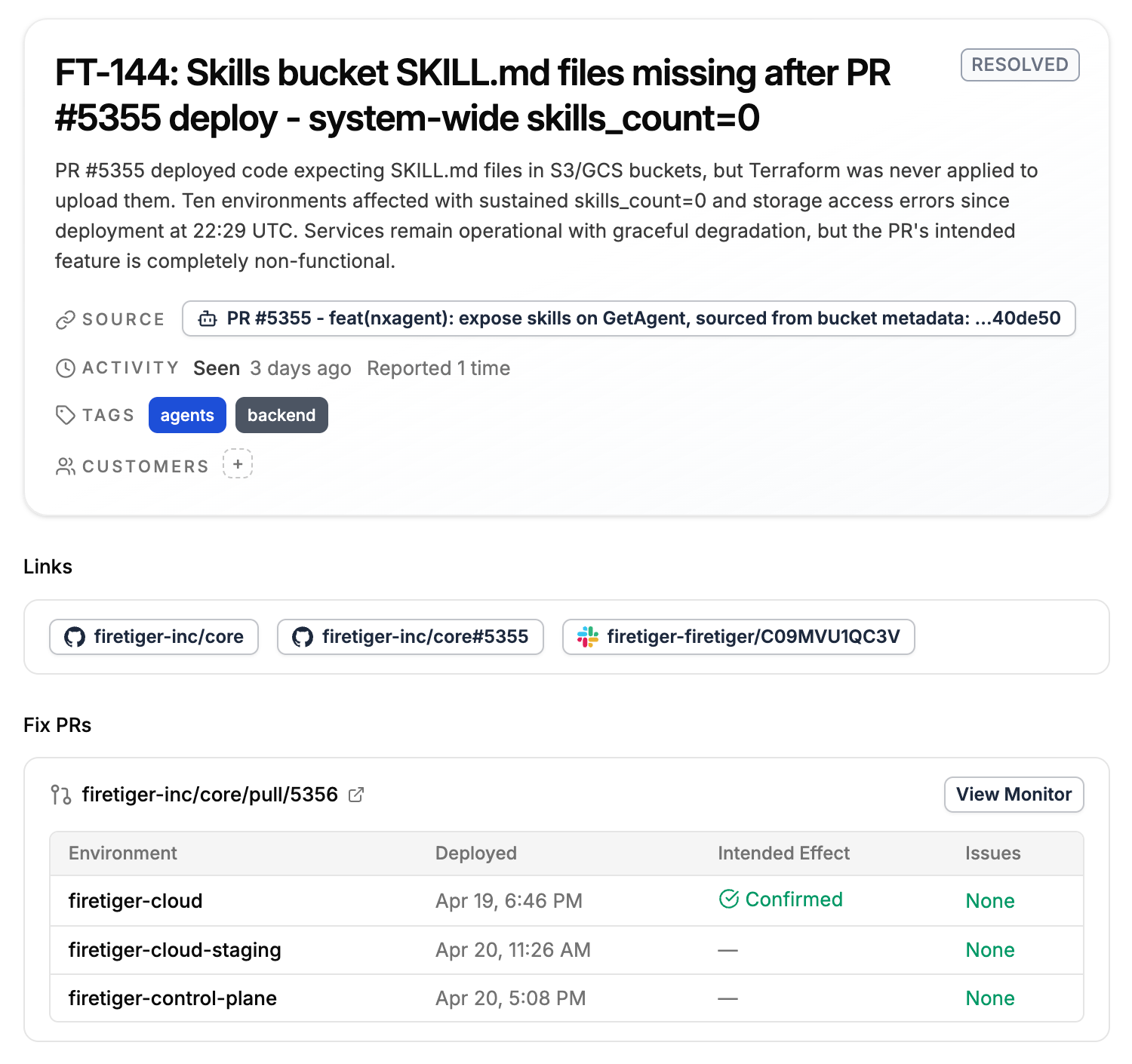
Nothing with the code was wrong, CI passed, deploy was green, health checks were fine. Catching this needed a system that knew what the PR was supposed to do and had the telemetry and intelligence to check.
Alright this is sick, how do I set it up?
Change Monitors need three things to work: a GitHub connection, a way for Firetiger to hear about your deployments, and access to observability data, either streamed into Firetiger or accessed on an external system.
Installing the GitHub Connection is a one-time step from the Integrations page. Once it is installed, tagging @firetiger on any PR in any connected repository creates a Change Monitor.
You can also enable automatic monitoring of pull requests. To keep signal high, auto-monitoring sits behind two optional filter steps, an author allow list and a natural language filter, allowing for expressive filters like "Monitor PRs that touch the authentication service or the billing pipeline, skip documentation and CI config".
Deployments come in one of two ways. If your CI/CD pipeline uses GitHub Deployments, you don't need to do anything extra: the existing webhook covers it. If you use any other system, a single POST /deployments call with repository, environment, and sha is enough. Most teams already have a post-deploy hook somewhere they can drop that call into.
Environments are discovered automatically from the deployments you send. A dedicated settings page lists every environment Firetiger has seen and lets you toggle monitoring per environment. You can also start a Change Monitor from the UI by pasting a PR URL, or from the MCP server by calling monitor_pr inside Claude Code or Cursor.
What our customers are seeing and saying
The use case we hear about most from the teams already using Change Monitors is the risky migration on a hot path, like a schema change on an authenticated endpoint or client library swap on the billing service.

Engineers making these changes want eyes on production for more than the ten minutes they are willing to sit and watch a dashboard. Sayan at Kernel says “receiving proactive ‘you’re all good!’ notifications six hours after a deploy is a magic moment, every time: a clean, specific report on what’s happened.”
We want to deliver the same magic moments to you!
Pricing
Every Firetiger account gets the first Change Monitor per day for free. That is enough for most individual developers and small teams to use the feature on the changes that matter most without thinking about cost.
Paid plans include an additional 250 Change Monitors per month. A Change Monitor counts against the quota the first time its plan activates on a deployment, not when the plan is drafted, so PRs that never ship never count.
Who this is for
If you are already a Firetiger user, Change Monitors are available for every project today. Your next PR is one @firetiger comment away from its first monitor, or zero if you turn auto-monitoring on.
Change Monitors are particularly useful for teams that ship many small changes per day, teams where agents are doing a material fraction of the code writing, and teams whose production systems are too large for any single engineer to know every place a given change could break. The common thread is that the cost of the post-deploy watching is adding up, and the catches are still getting missed.
They pair naturally with Firetiger's existing agent ecosystem. Issues filed by a Change Monitor can flow into Agent SLO dashboards, and they can be routed to Fix in Cursor or the Firetiger plugin for Claude Code to go from detection to a proposed pull request in one click.
From code to production, with a safety net
We built Change Monitors because the bottleneck to shipping software has moved. Writing code is no longer the slow step; making sure it’s running safely in production is. The next bottleneck in the software factory is that gap, and the right way to close it is to give every change its own monitoring plan, shaped by the specific diff and executed on deploy to find problems when they surface and confirm changes do what they’re supposed to.
Change Monitors are live today for all Firetiger users. Tag @firetiger on your next PR and let the deploy watch itself.